

This is a pretty common problem. I think it’s a question every developer has asked at one time or another: “I want to pass in a comma-separated list of values, then convert it into a table."
Every company I’ve ever worked for has had a function that does this. Everyone does it differently. It’s never efficient. I’ve seen it done in CLR, I’ve seen it done as a multi-statement table-valued user-defined function (which we all know is the devil’s work). The CLR works, but it’s a black-box to the average DBA or SQL developer. The multi-statement TVF performs terribly, but has never been used heavily enough to make it to the top of my tuning list.
This morning, I saw Pinal Dave (twitter|blog) post on his blog about this topic, and he used a really elegant XML-based solution. It’s one of those solutions that’s so simple, it’s incredibly hard.
When I got to my desk this morning, I immediately wrapped Pinal’s code into a function that was backwards compatible to a multi-statement TVF version and performance tested them head-to-head.
Here’s my function definition:
CREATE FUNCTION dbo.fn_split_new (
 @Text VARCHAR(8000)
 ,@Token VARCHAR(20) = ','
 )
RETURNS TABLE
AS
RETURN
SELECT ID = ROW_NUMBER() OVER (ORDER BY Value)
     , Value
FROM (
  SELECT Value = LTRIM(RTRIM(m.n.value('.[1]', 'varchar(8000)')))
  FROM (
    SELECT CAST(''
       + REPLACE(@Text, @Token, '')
       + '' AS XML) AS x
        ) t
  CROSS APPLY x.nodes('/XMLRoot/RowData') m(n)
  ) AS r
GO
I won’t bother you with the other function definition, suffice to say, it’s one of the uglier ones I’ve seen.
To test, I created a table, and populated it with 1,000,000 random comma-separated integers:
CREATE TABLE AM2_test (
 ID INT IDENTITY PRIMARY KEY
 ,Value VARCHAR(8000)
 ,Token VARCHAR(10)
 );

DECLARE @i INT = 0;

WHILE @i < 1000000
BEGIN
 INSERT INTO AM2_test (Value,Token)
 SELECT CAST(FLOOR(RAND() * 100) AS VARCHAR(8000)) + ','
  + CAST(FLOOR(RAND() * 10000) AS VARCHAR(8000)) + ','
  + CAST(FLOOR(RAND() * 100) AS VARCHAR(8000)) + ','
  + CAST(FLOOR(RAND() * 1000) AS VARCHAR(8000)) + ','
  + CAST(FLOOR(RAND() * 100) AS VARCHAR(8000)) + ','
  + CAST(FLOOR(RAND() * 1000) AS VARCHAR(8000))
  ,',';
 SET @i = @i + 1;
END;
First, let’s see what the old multi-statement TVF does for performance:
DBCC DROPCLEANBUFFERS --don't do this on Production
SET STATISTICS IO,TIME ON

SELECT s.ID, s.Value
FROM AM2_test t
CROSS APPLY dbo.fn_split_old(t.value, t.token) s --old TVF
On my laptop (4 cores, 8GB RAM, all SSD), it chugs for about 16 minutes. A million rows of input (and six million output) was probably overkill on sample size. The relevant IO and Time stats:
SQL Server Execution Times:Ouch. The use of that temp table (which gets scanned once per row) really kills I/O performance. It’s the equivalent of scanning the table 600 times. What’s the plan look like? It’s actually impractical to include the plan in truly meaningful way. But here’s a screenshot:
CPU time = 0 ms, elapsed time = 0 ms.
Table ‘#B036A535’. Scan count 1000000, logical reads 3000000…
Table ‘AM2_test’. Scan count 1, logical reads 5019…
SQL Server Execution Times:
CPU time = 932573 ms, elapsed time = 968913 ms.

So, what about Pinal’s XML-based single-statement method?
DBCC DROPCLEANBUFFERS --don't do this on Production
SET STATISTICS IO,TIME ON

SELECT s.ID, s.Value
FROM AM2_test t
CROSS APPLY dbo.fn_split_new(t.value, t.token) s --New version w/ Pinal's method
It ran for about about 7 minutes on my laptop (twice as fast!). The relevant IO and Time stats:
SQL Server Execution Times:But what’s the plan look like? It’s wide (I Photoshopped it to be less wide), but actually readable:
CPU time = 0 ms, elapsed time = 0 ms.
Table ‘Worktable’. Scan count 0, logical reads 12000001…
Table ‘AM2_test’. Scan count 1, logical reads 5019…
SQL Server Execution Times:
CPU time = 435351 ms, elapsed time = 444932 ms.
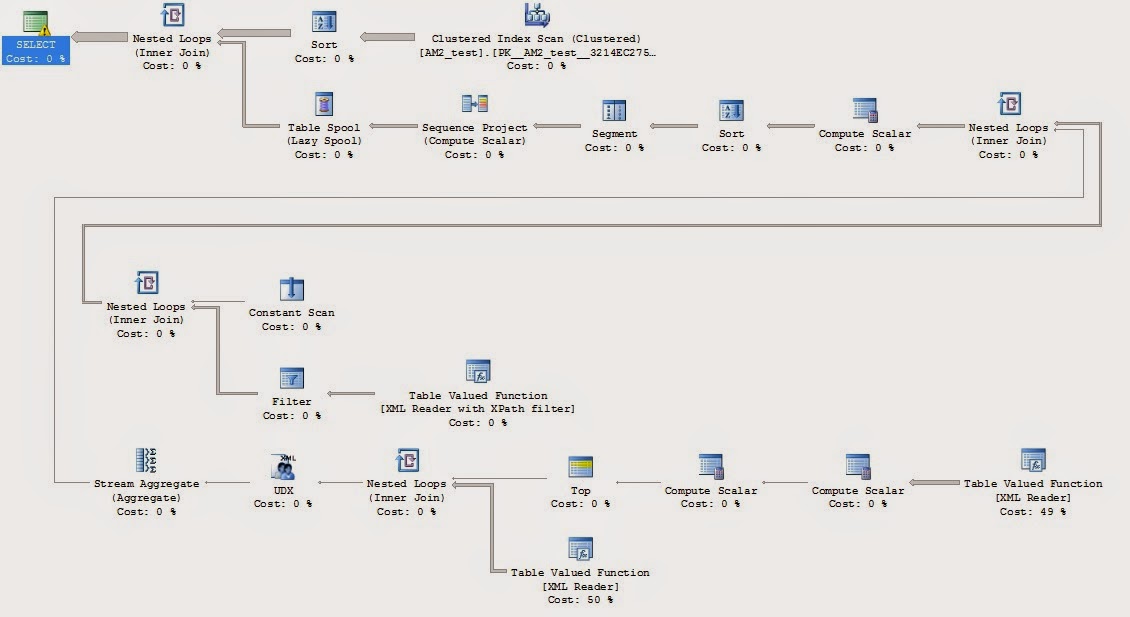
Are there better way to do this? Maybe. Probably. The beauty & curse of SQL is that there are a million ways to do the same thing, and each way has it’s own pros & cons. This version seems to be one of the better methods that I’ve seen.
Update (2015-04-23): My coworker pointed out that my initial version generated the IDs and ordered output according to the alphabetical order of the output Values. I’ve made a change to behavior to make that less confusing.
For example, passing in “C,B,A” originally generated output as:
| ID | Value |
|---|---|
| 1 | A |
| 2 | B |
| 3 | C |
I’ve now fixed it so that the ID now represents the indexed order of the position in the original delimited list. ie, passing in "C,B,A" now generates output as:
| ID | Value |
|---|---|
| 1 | C |
| 2 | B |
| 3 | A |
Update (2015-04-24): Aaron Bertrand (twitter|blog) has a much more comprehensive post about performance when splitting strings into tables using different methods. Definitely worth a read. In particular, he includes CLR in his comparison–something my (lack of) CLR skills kept me from including it as a comparison on my own list. SQL is terrible at string manipulation, so using CLR makes sense here, as long as you have the skills to write & support it.
Aaron also has a post about using table-valued parameters (TVPs) to pass in lists, and avoiding the need to split delimited lists altogether. As he points out, this requires re-writing more code, but has it’s own set of costs/benefits that might make this the best solution for you.