


Question
I'm a web developer and I want to export a database to work on it in my local machine.
I'm using generate script with data. the script is generated but without the linked servers used by some Views.
Is their a way to generate a full script with linked servers or do I have to create it manually with sp_addlinkedserver?
Asked2016-04-04byaboamin12
Answer
Linked servers are server-level objects--they are not contained within the database. Therefore you will need to move them separately.
In Management Studio, in the Object Explorer, Navigate to Server Objects --> Linked Servers --> [the linked server you want].
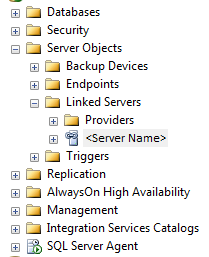
Then just right-click --> Script Linked Server as... --> CREATE to --> [pick a destination]. This will not script out passwords.
If the linked server has stored credentials, you will need to re-input the password. You can either edit the call to sp_addlinkedsrvlogin in the generated script (replace "########" with the real password), or edit the linked server from Management Studio after creating it with the wrong password. Saving the script with the password embedded is not a good security practice, so I generally opt to either edit the script at runtime, or edit the authentication settings after the fact.
Answered2016-04-04byAndy Mallon