


Question
In the good old days there was a shortcut ctrl-B for changing the size of the Query & Result panes in the Query Analyzer sql editor.
In Query Analyzer, just press ctrl-B and the screen splitter handle was in focus. Then repeatedly press up/down arrows until the size was right.
Is there a shortcut for that nowadays, in SSMS?
Asked2016-05-16byLosManos
Answer
SSMS has no equivalent shortcut to the CTRL+B shortcut from Query Analyzer.
In my opinion, the best alternate feature is the ability to have query & results in separate tabs. In this way, I can flip between full-screen query & results easily, and maximize screen real estate for both.
To enable this in SSMS:
- Go to Tools-->Options...
- In the left navigation tree, go to Query Results-->SQL Server-->Results to [Grid/Text] (The option exists for both grid & texts)
- Mark the checkbox for "Display Results in a separate tab"
- Optionally mark the checkbox for "Switch to results tab after the query executes"
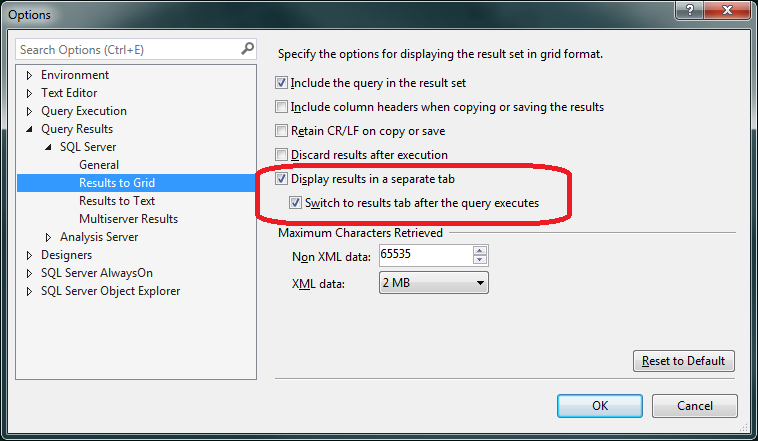
You will need to open a new SSMS query tab for the change in setting to take effect.
You can then use F6 (or Shift+F6) to cycle your focus forward (or backwards) between Query, Results, and Messages tabs. If you have multiple result sets on the Results tab, each press of F6 will bring your query focus to the next result set.
Answered2016-05-16byAndy Mallon