


Question
doing some work with the SQL Perfmon counters and banging my head against the wall trying to work out how to translate the instance_name column to a database name. So if I run a query like the following
SELECT top 10 left(counter_name, 25), left(instance_name,40), cntr_value
FROM sys.dm_os_performance_counters
WHERE counter_name = 'Log Bytes Received/sec'
I get a resultset like
How do I translate the value of instance_name (100f6a49-cd58-432a-8680-ed0f1069c5ea) to a database_name I thought I could look in sys.databases but no luck
Asked2021-11-09byStephen Morris - Mo64
Answer
That GUID actually ties back to the physical_database_name column in sys.databases.
From the docs:
For SQL Server, the physical name of the database. For Azure SQL Database, a common id for the databases on a server.
However, looking at that column on my own Azure SQL DB, the behavior is a little surprising to me. I created two SQL DBs on the same server.
If I connect to master and run the query:
SELECT name, physical_database_name
FROM sys.databases;
All three rows in the results (master + the two databases) have the same physical_database_name (6dfa05ee-9c60-4288-a344-11f9f1459dcc):
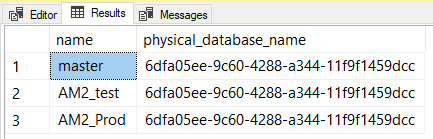
When I connect to a specific user database, that GUID changes, based on which database I am connected to. (Also, you cannot see the user databases that you are not connected to. That part is expected!)
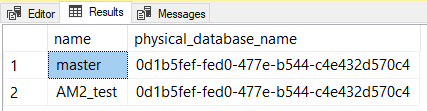
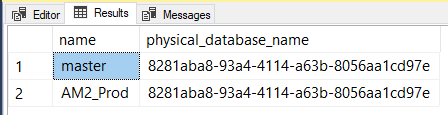
I'm not sure why that column populates based on the current database context, and not based on the row. That is awfully confusing, if you ask me.
So, to correlate that GUID from sys.dm_os_performance_counters back to a specific database, you'll need to connect to each database, query the physical_database_name from sys.databases and then match up all those separate result sets from the separate databases to map GUID to a name.
Answered2021-11-09byAndy Mallon