


Question
I have a SQL query that looks for values in a table on a range of dates.
If no record is found, I would like to generate rows with default values.
Example of one of the table existing records:
| DeviceId | Time | Context | Value |
|---|---|---|---|
| 1 | 2022-02-10 | Connected | False |
So a query that restricts on the Time column between 2022-02-07 and 2022-02-10 must create fake rows for February 7th, 8th, and 9th but not for the 10th because that already exists.
Expected result:
| DeviceId | Time | Context | Value |
|---|---|---|---|
| 1 | 2022-02-7 | Fake | False |
| 1 | 2022-02-8 | Fake | False |
| 1 | 2022-02-9 | Fake | False |
| 1 | 2022-02-10 | Connected | False |
How can I do that? With a recursive CTE?
Asked2022-02-10byanon
Answer
When I think about what you're trying to accomplish, I would describe it in this way, using "plain English":
- Return the results of some query
- But if no results exist, then return some default values.
My thought process took the immediate leap of "What if I always include the defaults, but then somehow filter them out when there exist real results.
After pondering over my cup of morning coffee, I realized this is actually pretty easy to do with CTEs. No recursion needed, but I will use two CTEs.
## That real queryLets start by throwing your real query into a CTE. This makes it easy to reference the results from the query multiple times, pretty easily. In this example, I'm just going to query sys.objects, and put the whole darn thing into a CTE:
DECLARE @ObjectName nvarchar(128) = N'sysschobjs';

RealQuery AS (
    SELECT object_id, name
    FROM sys.objects
    WHERE name = @ObjectName
    )
SELECT *
FROM RealQuery;
Now for the defaults
I'm doing the same treatment here. Just making up some default placeholders, and abstracting them away into a CTE that I can reference easily. Maybe your default values are stored in some table somewhere, or maybe you prefer to stuff them into a #temp table or table @variable, in which case you wouldn't need to use a CTE here.
WITH Defaults AS (
    SELECT *
    FROM (VALUES (1,N'One'),(2,N'Two'),(3,N'Three')) AS x(Id,Name)
    )
SELECT *
FROM Defaults;
Time for a mashup
Now, with our real query in a CTE, and our "default" values in another, I simply UNION ALL the "real" results and the default place holders. The "magic" is to use WHERE NOT EXISTS (SELECT 1 FROM RealQuery) to control whether those defaults are included.
This returns a single row, matching the object name sysschobjs, and does not return the default placeholders:
DECLARE @ObjectName nvarchar(128) = N'sysschobjs';

WITH Defaults AS (
    SELECT *
    FROM (VALUES (1,N'One'),(2,N'Two'),(3,N'Three')) AS x(Id,Name)
    ),
RealQuery AS (
    SELECT object_id, name
    FROM sys.objects
    WHERE name = @ObjectName
    )
SELECT *
FROM RealQuery
UNION ALL
SELECT *
FROM Defaults
WHERE NOT EXISTS (SELECT 1 FROM RealQuery);
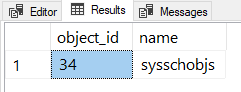
And if you change that first line to a value that doesn't exist in sys.objects then you'll get the placeholder default results instead:
DECLARE @ObjectName nvarchar(128) = N'AMtwo';
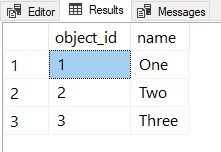
My solution works, but it may not be ideal. For example, if you look at the execution plan, you'll see it's running the "real" query twice. That's totally fine for this trivial query, but for other cases that might not work as well.
You might be better off simply running your "real" query to insert into a #Results temp table, then checking how many rows are in the temp table.
IF EXISTS (SELECT 1 FROM #Results)
BEGIN
    INSERT INTO #Results(Id,Name)
    SELECT *
    FROM (VALUES (1,N'One'),(2,N'Two'),(3,N'Three')) AS x(Id,Name);
END;

SELECT *
FROM #Results;
Answered2022-02-10byAndy Mallon