Question When I am running:
Ctrl+Alt+R will run the web browser in an SSMS tab. However, this now produces the message:
I do have MS Edge installed but SSMS is not finding it. What should I do to help SSMS find MS Edge and use it?
Question (This is just a "reproducer", not the real code, because that's long and complicated.)
The output of
SET NOCOUNT ON select @@SERVICENAME select @@version is:
----------------------------------------------------------------------------- MSSQLSERVER …
There’s a lot of advice out there on the internet that suggests that you should not install SSMS on your database servers running SQL Server.
This came up at work recently, where I was asked “Should we install SSMS on our database servers?” and my answer is:
The number of people who really love having their code [quoted] with [square brackets] is pretty small. The vast majority of people who I meet really hate them, and promptly remove them.
Question Is there a simple way to reconnect a query window that is “not connected” to the original connection that was used by that query without manually picking the server name needed? If I click the Connect button on the SQL Editor toolbar or right click …
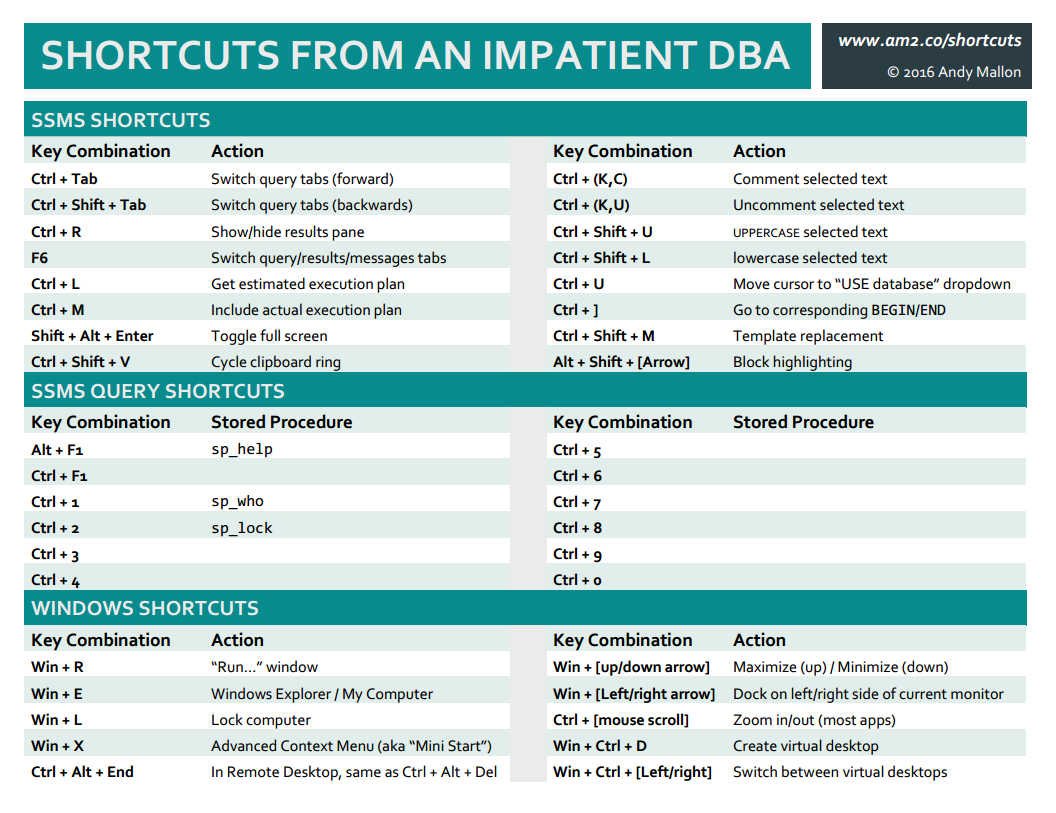
Shortcuts & tips from an Impatient DBA This series of short posts will demonstrate some lesser-known features, keyboard shortcuts, and other tips that make my day as a DBA more productive. None of these are groundbreaking super-secret features–they are the …
Shortcuts & tips from an Impatient DBA This series of short posts will demonstrate some lesser-known features, keyboard shortcuts, and other tips that make my day as a DBA more productive. None of these are groundbreaking super-secret features–they are the …
Question In the good old days there was a shortcut ctrl-B for changing the size of the Query & Result panes in the Query Analyzer sql editor. In Query Analyzer, just press ctrl-B and the screen splitter handle was in focus. Then repeatedly press up/down …
Edit: I've published an updated version of my cheat sheet. Find the latest version by in the sidebar --> I've presented my **Shortcuts from an Impatient DBA** talk a few times now, and I really love it. Everyone learns something, whether you're a Junior …
Shortcuts & tips from an Impatient DBA #11 This series of short posts will demonstrate some lesser-known features, keyboard shortcuts, and other tips that make my day as a DBA more productive. None of these are groundbreaking super-secret features–they are the …